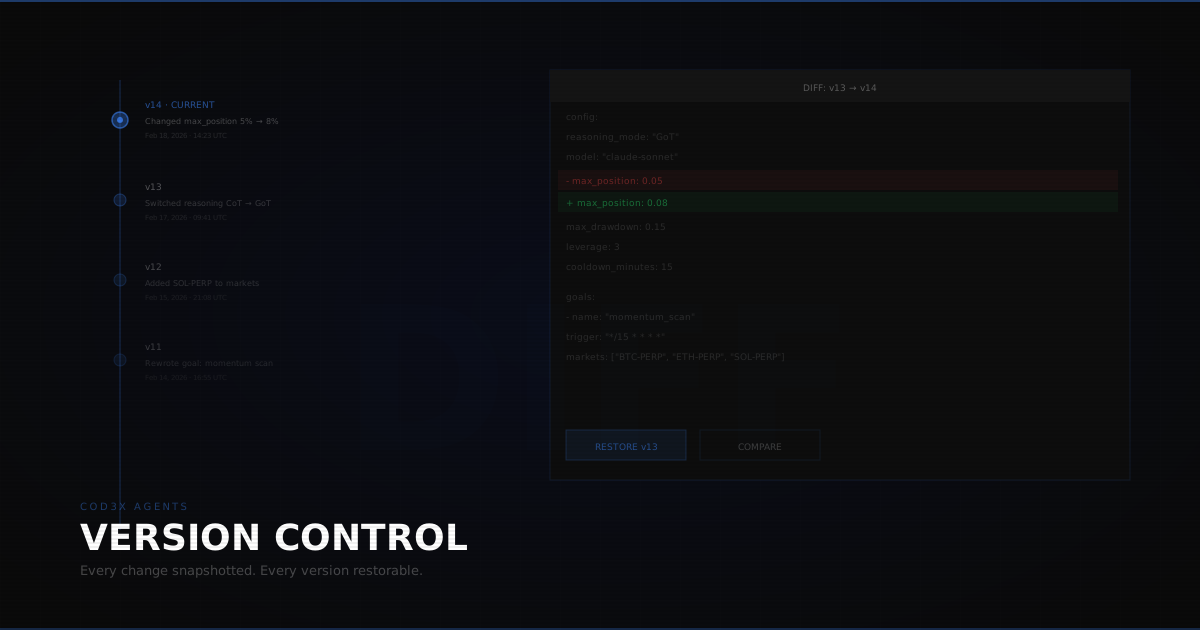
Every change to your agent is saved automatically. Every configuration tweak, every goal modification, every parameter adjustment — snapshotted with a timestamp. Version control for trading strategies.
Automatic Snapshots#
You don't need to manually "save" your agent configuration. Every modification creates a new version:
- Changed the max position size from 5% to 8%? New snapshot.
- Rewrote a goal prompt? New snapshot.
- Switched reasoning mode from CoT to GoT? New snapshot.
- Added a new goal to the agent? New snapshot.
Each snapshot captures the complete state: all configuration fields, all goals (with trigger conditions), all risk parameters, all tool selections. Nothing is partial — every snapshot is a fully restorable configuration.
Version History#
The version timeline shows every snapshot in chronological order:
- Timestamp — When the change was made
- What changed — Summary of modified fields
- Diff view — Exact before/after comparison of changed values
Scroll through the timeline to see how your agent evolved. Maybe you've been tightening the stop-loss over the past week. Maybe you switched AI models three times. The history shows the full story.
Compare Versions#
Select any two versions for side-by-side comparison:
- Additions highlighted (new goals, new parameters)
- Removals highlighted (deleted goals, removed tools)
- Changes highlighted with before → after values
This is most useful when your agent's performance changed and you're trying to figure out which modification caused it. Compare last week's config (when it was profitable) with this week's (when it started losing) and see exactly what's different.
Selective Restore#
Restoring isn't all-or-nothing. Three restore options:
Restore Config Only#
Roll back the agent's configuration (AI model, reasoning mode, risk parameters, tool selection) while keeping the current goals unchanged.
Use case: You changed the risk parameters and performance degraded, but the goal modifications were good. Restore the old config, keep the new goals.
Restore Goals Only#
Roll back all goals (prompts, trigger conditions, chain connections) while keeping the current configuration unchanged.
Use case: You rewrote a goal prompt and the agent started making worse decisions, but you also upgraded the AI model and want to keep that change.
Restore Everything#
Full rollback to the selected version. Config and goals both revert.
Use case: You made multiple changes at once and want to return to a known-good state.
Non-Destructive#
Every restore operation creates a new snapshot. Restoring version 12 doesn't delete versions 13-18 — it creates version 19 that matches version 12's state. You can always undo a restore by restoring the version before the restore.
There's no way to permanently lose a configuration through version control operations.
A/B Testing Strategies#
Version control enables systematic strategy comparison:
- Save your current config as the baseline (it's already saved automatically)
- Make modifications — adjust parameters, change goals, try a different approach
- Run both versions for a defined period (e.g., one week each)
- Compare performance using the trading journal filtered by date range (or run a backtest on each version)
- Pick the winner — keep the better-performing version, restore if the baseline was superior
Without version control, A/B testing is manual and error-prone. You'd need to remember the old settings, write them down, and manually reconfigure if the new approach fails. With automatic snapshots, the old version is always one click away.
Version Control + Goal Chaining#
Version control captures goal chain connections. If you built a complex scan → analyze → execute chain and then modified it, restoring an earlier version restores the entire chain structure — including trigger connections between goals.
This prevents the nightmare scenario: you break a working chain by modifying one goal, and you can't remember how the connections were wired. Restore the previous version and the chain is back, exactly as it was.
Version Control + Templates#
Saving an agent as a template captures the current version. But if you later modify the agent, the template retains the original configuration. Templates are independent snapshots — changing the source agent doesn't change the template.
This means you can safely experiment with a proven agent without risking the template that others might be using.
What It Costs#
Nothing. Version control is automatic and included with every agent. No additional credits, no storage fees, no opt-in required.
Every agent has unlimited version history. Old versions are never pruned or deleted.
Every change snapshotted. Any version restorable. Config and goals independently rollbackable. Version control for trading agents is automatic, non-destructive, and free.